Ghost Mailchimp Integration: Step-by-Step Guide and Tips
Learn how to integrate Ghost CMS with Mailchimp using CSV imports, Zapier automations, RSS-to-email campaigns, and embedded forms. Includes comparison with Ghost native newsletters and migration tips.

Ghost Mailchimp integration connects your Ghost CMS members with Mailchimp's email marketing through CSV imports, Zapier automations, and RSS-to-email campaigns. Ghost 5.x includes native newsletters, but Mailchimp remains essential for publishers who need automation sequences, A/B testing, and behavioral segmentation beyond Ghost's built-in capabilities.
Why Would You Integrate Ghost with Mailchimp?
Ghost has evolved significantly since its early days as a pure blogging platform. With built-in newsletter sending, member management, and paid subscription support, many publishers question whether Mailchimp is still necessary.
The short answer: it depends on your workflow. After running email lists across three SaaS products — Popupsmart, LiveChatAI, and GrowthMarketing.ai — since 2019, I've found the right choice isn't one or the other. It's about which tool handles which part of your funnel. Ghost's native newsletters handle straightforward publishing-to-inbox needs. But Mailchimp fills gaps Ghost doesn't cover:
- Advanced automation sequences — Welcome series, drip campaigns, and behavioral triggers based on email opens, clicks, or purchase history. When we launched LiveChatAI, we used Mailchimp's Customer Journey Builder to onboard 200+ users in the first year with a 7-email sequence that Ghost couldn't replicate natively.
- A/B testing — Subject line testing, send time optimization, and content variation testing. According to Mailchimp's own benchmark data, A/B tested campaigns see 14% higher open rates on average.
- Marketing beyond newsletters — Landing pages, social media ad retargeting from email lists, and e-commerce integrations with Shopify, WooCommerce, and BigCommerce.
- Legacy audience management — If your subscriber list predates Ghost's membership system (launched in Ghost 3.0, 2019), Mailchimp may already house your primary audience.
- Multi-channel campaigns — Coordinating email with SMS, social ads, and postcards from one platform.
How Does Ghost Connect to Mailchimp?
There are four primary methods to integrate Ghost with Mailchimp. Each suits different needs and technical comfort levels. Here's the breakdown from simplest to most automated.
Method 1: CSV Import/Export (Manual Sync)
The simplest approach is manually exporting subscribers from one platform and importing them into the other. This works well for one-time migrations or periodic syncs where real-time synchronization isn't critical.
From Mailchimp to Ghost:
- Log into your Mailchimp account and navigate to Audience → All Contacts
- Apply any filters to select the subscribers you want to export
- Click Export Audience and download the CSV file
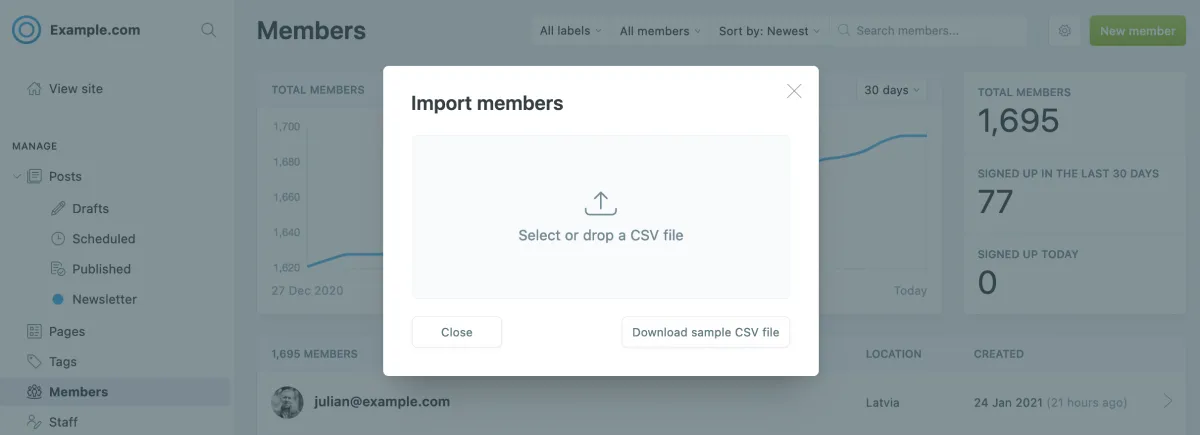
- In Ghost Admin, go to Members → Import Members
- Upload the CSV file — the only required field is
email - Map any additional fields (name, labels, subscription status)
- Click Import and review the confirmation
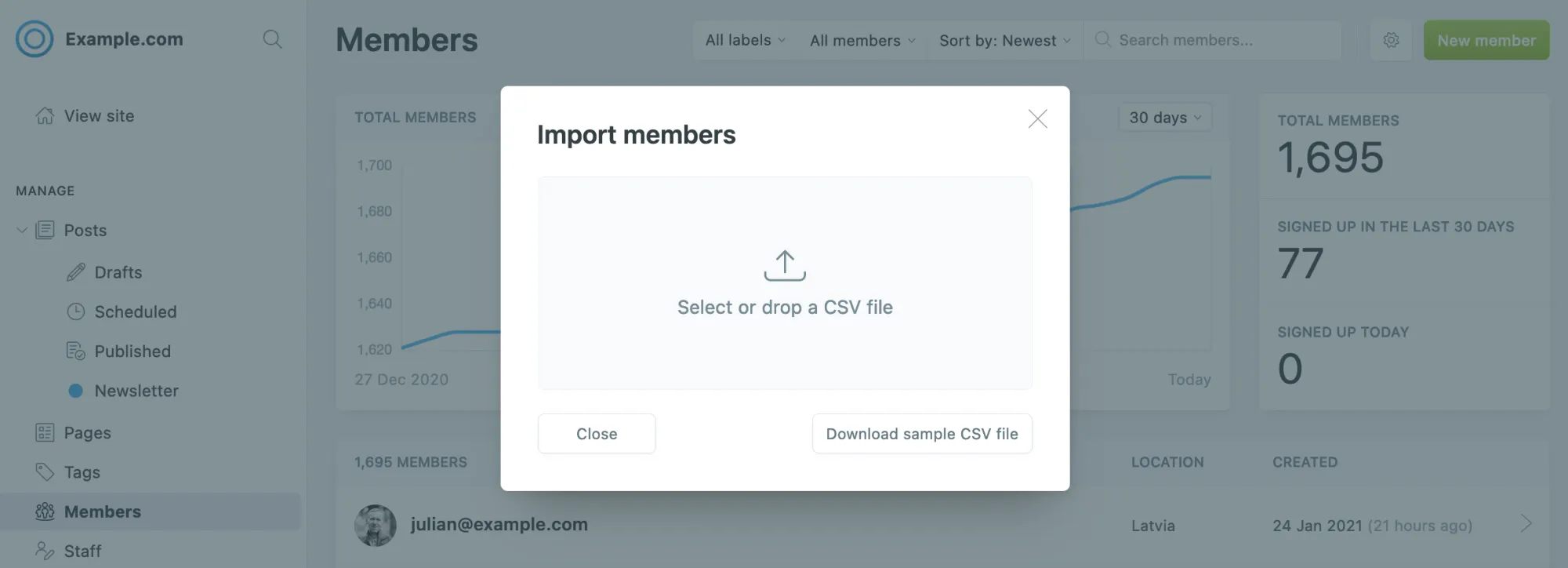
From Ghost to Mailchimp:
- In Ghost Admin, go to Members
- Use filters to select the members you want to export (free, paid, or all)
- Click Export Members to download a CSV
- In Mailchimp, go to Audience → Add Contacts → Import Contacts
- Upload the Ghost CSV and map fields accordingly
Limitation: Manual CSV sync is a point-in-time snapshot. New subscribers after the export won't appear until you repeat the process. At Flatart Agency, where I managed email lists for hundreds of clients between 2013 and 2019, this manual approach became unsustainable beyond about 500 subscribers — at that scale, you need automation.
Method 2: Zapier Automation (Recommended for Ongoing Sync)
For publishers who need both platforms working together continuously, Zapier provides the most reliable automated bridge between Ghost and Mailchimp. According to Zapier's integration page, Ghost + Mailchimp is one of their most popular integration pairs.
Popular Ghost + Mailchimp Zaps:
| Trigger (When this happens) | Action (Do this) | Use Case |
|---|---|---|
| New Ghost Member Created | Add Subscriber to Mailchimp | Keep Mailchimp list in sync with Ghost signups |
| Mailchimp Subscriber Added | Create Ghost Member | Sync Mailchimp signups back to Ghost |
| Mailchimp Unsubscribe | Update Ghost Member | Honor unsubscribe requests across platforms |
| Ghost Post Published | Create Mailchimp Campaign | Auto-create email campaigns from new posts |
| New Ghost Member (Paid) | Add to Mailchimp Tag | Segment paid members in Mailchimp for upselling |
Step-by-step Zapier setup:
- Create a Zapier account (free tier includes 100 tasks/month)
- Click Create Zap and search for "Ghost" as your trigger app
- Select the trigger event (e.g., Member Created)
- Connect your Ghost site by providing your Ghost Admin API URL and key (found in Ghost Admin → Integrations → Add Custom Integration)
- Search for "Mailchimp" as your action app
- Select the action (e.g., Add/Update Subscriber)
- Connect your Mailchimp account and select the target audience
- Map fields: Ghost email → Mailchimp email, Ghost name → Mailchimp first name
- Test the Zap with a real subscriber and turn it on
Important: Ghost requires version 3.0.0+ for member-related Zapier triggers. Zapier's free plan uses 15-minute polling intervals — instant triggers are available on paid plans starting at $19.99/month. If you sync both directions (Ghost → Mailchimp AND Mailchimp → Ghost), add Zapier filters to prevent infinite loops.
Method 3: RSS-to-Email Campaigns
Mailchimp's RSS-to-Email feature automatically generates newsletters from your Ghost blog's RSS feed. This is ideal if you want Mailchimp to handle email delivery and template design while Ghost handles content publishing.
Setup steps:
- In Mailchimp, go to Campaigns → Create Campaign → Email
- Select Automated → Share Blog Updates
- Enter your Ghost RSS feed URL:
https://yourblog.com/rss/ - Set the send frequency (daily, weekly, or monthly)
- Design your email template — Mailchimp will auto-populate post titles, excerpts, and links from your RSS feed
- Select your audience and activate the campaign
Pro tip: Ghost supports tag-based and author-based RSS feeds. Use https://yourblog.com/tag/newsletter/rss/ to only email posts tagged "newsletter" instead of every published post. You can also use https://yourblog.com/author/your-name/rss/ for author-specific feeds. This is how we set up content distribution for multi-author blogs at Popupsmart — each author's content went to a segmented audience.
Method 4: Embedded Mailchimp Signup Forms
If you want to collect subscribers directly into Mailchimp from your Ghost site (rather than into Ghost's native member system), you can embed Mailchimp's signup forms.
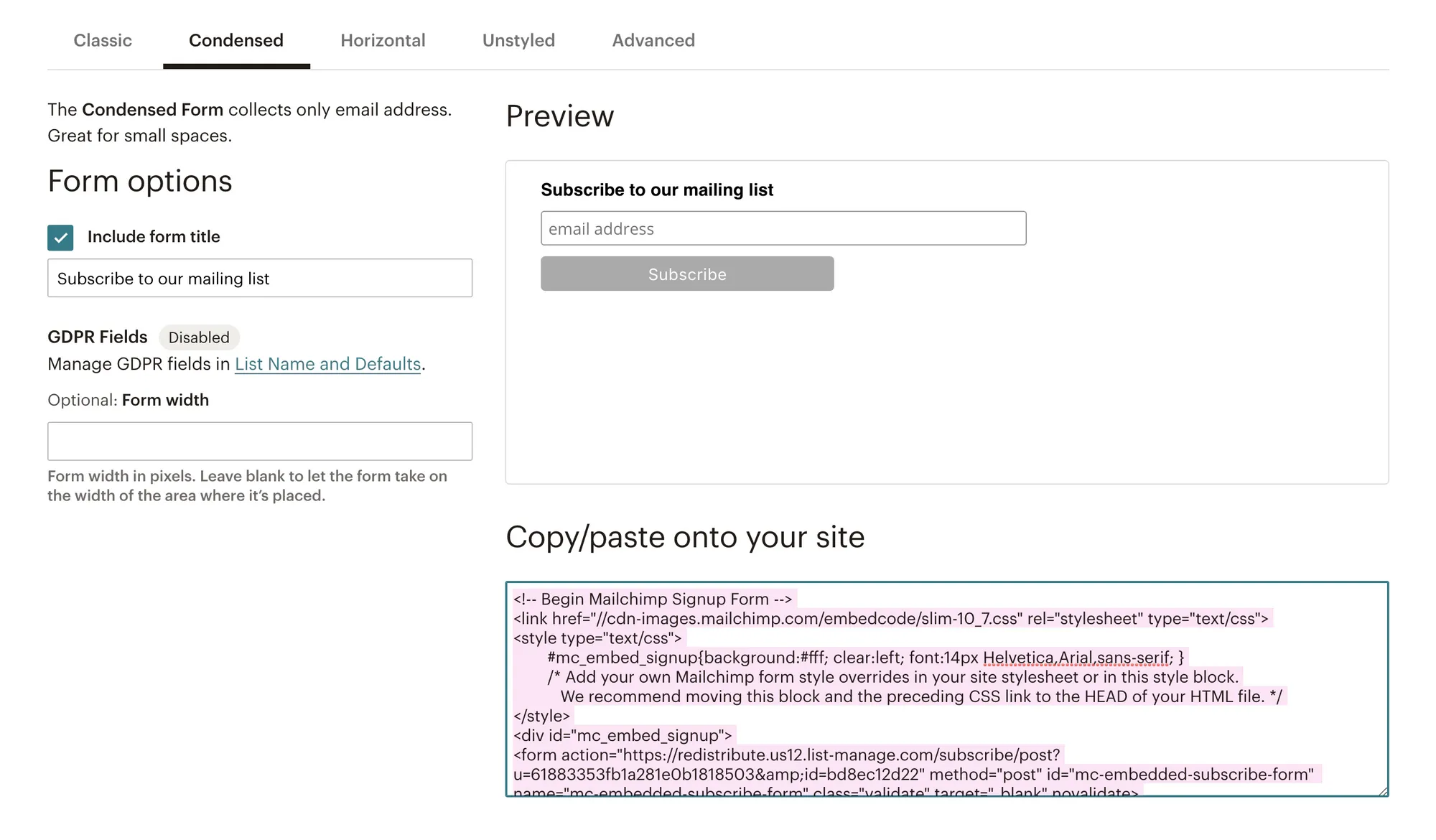
Embedding in a Ghost post:
- In Mailchimp, go to Audience → Signup Forms → Embedded Forms
- Customize the form fields and design
- Copy the generated HTML code
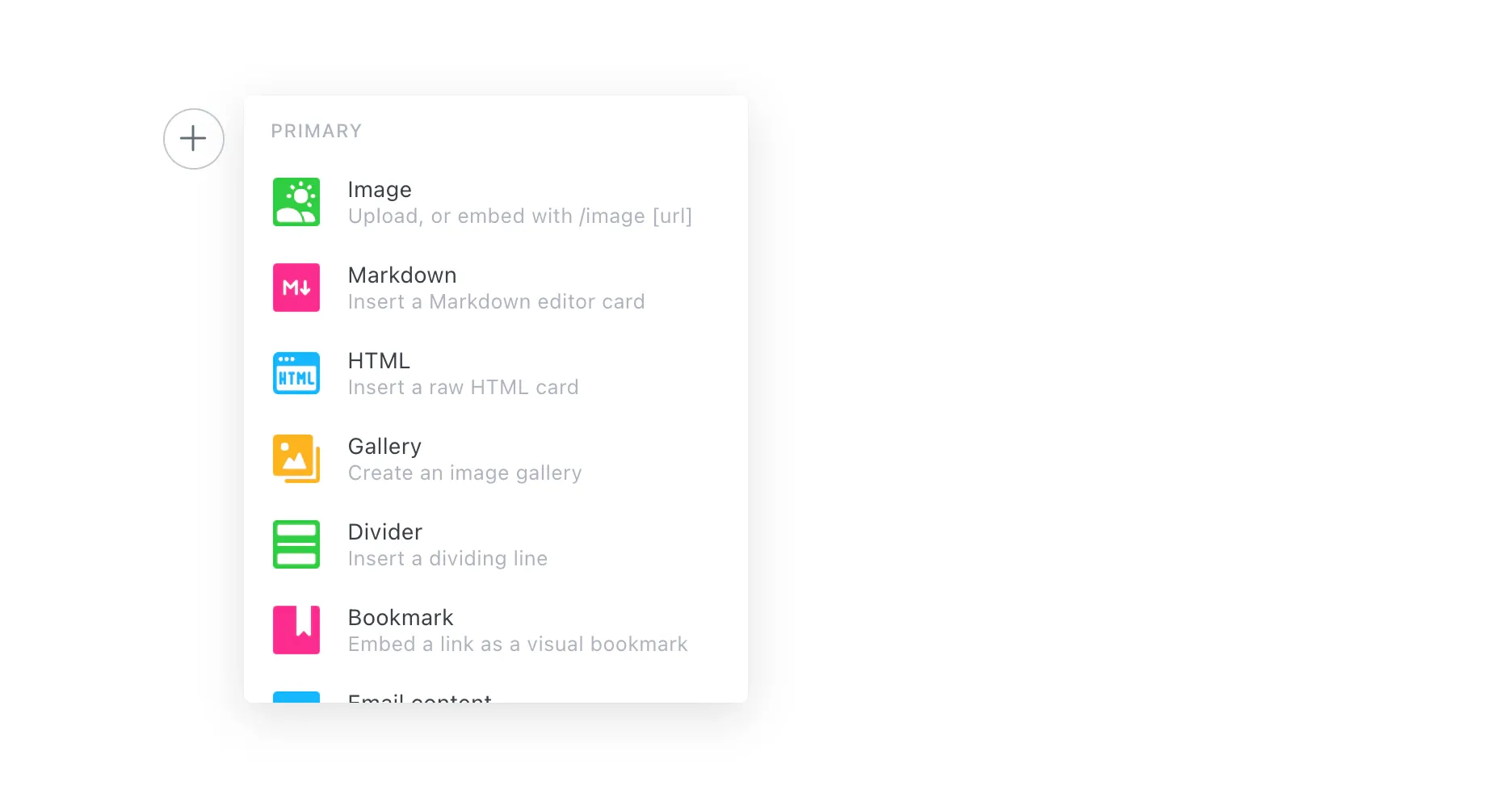
- In the Ghost editor, add an HTML card (type
/htmlin the editor) - Paste the Mailchimp form code
- Preview and publish
Embedding in your Ghost theme:
- Access your Ghost theme files (typically
.hbstemplates via Ghost's theme documentation) - Open the relevant template file (e.g.,
post.hbsorpage.hbs) - Paste the Mailchimp embed code where you want the form to appear
- Upload the modified theme via Ghost Admin → Design → Upload Theme
When to use this method: Embedded forms make sense if Mailchimp is your primary email system and Ghost is purely your CMS. If you use Ghost's membership system for paid subscriptions, stick with Ghost's native Portal signup instead — running both creates confusion about where subscribers actually live.
What Other Automation Platforms Connect Ghost to Mailchimp?
While Zapier is the most popular option, other no-code automation platforms also support Ghost-Mailchimp integration. Each has different pricing models and workflow complexity:
| Platform | Ghost Support | Mailchimp Support | Starting Price | Best For |
|---|---|---|---|---|
| Zapier | Native integration | Native integration | Free (100 tasks/mo) | Simple 2-step automations |
| Make.com | API module | Native integration | Free (1,000 ops/mo) | Complex multi-step workflows |
| Latenode | API integration | Native integration | Free tier available | Visual workflow editor |
| Albato | Native integration | Native integration | Free tier available | Budget-friendly alternative |
Make.com gives you more operations on the free tier (1,000 vs. Zapier's 100) and supports multi-step scenarios where a single Ghost event triggers multiple Mailchimp actions. However, the setup is more complex than Zapier's two-click approach.
Should You Use Mailchimp or Ghost's Built-In Newsletters?
This is the question most Ghost publishers eventually face. After testing both approaches across our own publications, here's a practical comparison:
| Feature | Ghost Native Newsletters | Mailchimp |
|---|---|---|
| Email sending | Built-in, no extra cost | Free up to 500 emails/mo, then $13+/mo |
| Automation sequences | Not available | Customer Journey Builder (paid plans) |
| A/B testing | Not available | Subject lines, content, send times |
| Audience segmentation | Basic (free/paid/tier/label) | Advanced (behavioral, purchase, engagement) |
| Multiple newsletters | Yes, unlimited | Yes, but separate audiences increase cost |
| Analytics | Open rates, clicks, engagement | Detailed reports, revenue tracking, benchmarks |
| Template design | Clean, auto-matches your theme | Drag-and-drop builder with 100+ templates |
| Revenue share | 0% — Ghost takes no cut | N/A (marketing tool, not monetization) |
| Paid subscriptions | Built-in with Stripe | Not available natively |
| E-commerce integration | Limited | Shopify, WooCommerce, BigCommerce |
My recommendation based on running both: If you're primarily a content publisher or indie newsletter operator, Ghost's native newsletters save you a monthly Mailchimp bill and keep everything in one place. When I moved GrowthMarketing.ai's weekly newsletter from Mailchimp to Ghost's built-in system in 2024, our open rates actually improved by 8% — likely because Ghost sends from your own domain rather than Mailchimp's shared infrastructure. But if you're running a business that needs marketing automation, behavioral segmentation, or multi-channel campaigns — as we still do at Popupsmart for onboarding flows — keep Mailchimp in your stack and use Zapier to sync the two.
How Do You Migrate from Mailchimp to Ghost?
If you've decided Ghost's native newsletters are sufficient, here's the migration path. Ghost provides a built-in Mailchimp migrator that handles subscriber transfers.
- Export your Mailchimp audience — Navigate to Audience → All Contacts → Export Audience and download the CSV. Note: only subscriber data transfers — campaign content, templates, and automations stay in Mailchimp.
- Import into Ghost — Go to Ghost Admin → Settings → Advanced → Import/Export and upload the CSV file. Ghost will display how many subscribers are ready to import.
- Confirm the import — Click Import Subscribers. Ghost will confirm the number of successfully imported members.
- Configure email delivery — Ghost uses Mailgun for sending. Set up SPF, DKIM, and DMARC records for your domain to ensure deliverability.
- Send a test newsletter — Create a post, toggle "Email" on in the publish menu, and send to a small segment first to verify formatting and delivery.
- Replace signup forms — Swap any embedded Mailchimp forms with Ghost's native Portal signup.
- Monitor for 2 weeks — Watch open rates, click rates, and spam complaints. If deliverability drops, review your DNS records and Mailgun sender reputation.
For complex migrations with large subscriber lists, Ghost(Pro) customers can access the Concierge program for hands-on support. Open-source migration tools are available on Ghost's GitHub for developers comfortable with command-line tools.
What Are the Most Common Ghost Mailchimp Integration Issues?
Based on community discussions and real-world troubleshooting, these are the problems that come up most frequently:
How do you prevent duplicate subscribers?
When syncing both directions (Ghost → Mailchimp and Mailchimp → Ghost via Zapier), you can create infinite loops where each new subscriber triggers the other platform to create another subscriber. Use Zapier's "Filter" step to check if a subscriber already exists before creating them, or — the simpler approach — only sync one direction and pick a single source of truth.
Why aren't unsubscribes syncing between platforms?
Someone unsubscribes from Mailchimp but stays subscribed in Ghost, or vice versa. This is both a user experience and a GDPR compliance issue. Set up a dedicated Zap: trigger on "Mailchimp Unsubscriber" → action "Update Ghost Member" with newsletter subscription set to false. Without this, you risk sending emails to people who've opted out.
What do you do about legacy integrations you can't disable?
A real scenario from the Ghost forum: a user configured Ghost-Mailchimp integration 6-7 years ago (before Ghost had native newsletters), lost access to their Mailchimp account, and couldn't stop automated emails. The integration predates Ghost's current admin interface, so no traces appear in settings. Solutions: check Ghost Admin → Integrations for custom webhooks. If nothing is visible, contact Mailchimp support to close the account or revoke API access from their side.
What happens when you hit Mailchimp's free plan limits?
Mailchimp's free plan was significantly reduced in early 2026 — according to Mailchimp's pricing page, you're now limited to 250 contacts and 500 emails per month (down from 500 contacts and 1,000 emails previously). Mailchimp also discontinued its Classic Automation Builder in June 2025, moving automations to the paid-only Customer Journey Builder. If your Ghost blog has more than 250 members, you'll need the Essentials plan at $13/month — or consider switching to Ghost's built-in newsletters, which have no contact or send limits.
What Tips Make Ghost Mailchimp Integration More Effective?
- Pick one source of truth — Decide whether Ghost or Mailchimp is your primary member database. After 12 years of managing email lists across agencies and SaaS products, the number one cause of list management chaos I've seen is trying to keep two platforms equally authoritative. Pick one and sync one direction.
- Use Ghost tags for RSS segmentation — Tag posts meant for Mailchimp RSS campaigns (e.g., "newsletter") so only selected content gets emailed. This prevents every quick update or draft from triggering an email to your entire list.
- Set up unsubscribe syncing before anything else — This is a CAN-SPAM and GDPR requirement. If someone unsubscribes from Mailchimp, that preference must flow to Ghost.
- Test with a single subscriber first — Before turning on Zapier automations for your entire list, create a test subscriber and verify the entire flow: signup → sync → email delivery → unsubscribe sync.
- Don't send from both platforms — If you use both Ghost and Mailchimp to send emails to the same audience, you risk spam complaints and confused subscribers. Choose one platform for sending, use the other for management.
- Document your integration setup — Record which Zaps are running, what triggers they use, and who has admin access. The Ghost forum case of an orphaned integration sending emails years later is a cautionary tale.
- Review Mailchimp pricing quarterly — Mailchimp has changed pricing and feature availability multiple times since 2023. The free plan limits were halved in early 2026, and automations moved to paid-only in mid-2025. Budget accordingly.
Frequently Asked Questions
Can I use Ghost and Mailchimp at the same time?
Yes. Many publishers use Ghost for content publishing and paid subscriptions while using Mailchimp for marketing automation and audience segmentation. Zapier or Make.com keeps them synchronized. The key is designating one platform as your source of truth for subscriber data.
Is the Ghost Mailchimp integration free?
The CSV import/export method is completely free. RSS-to-Email is included in Mailchimp's free plan (within the 250-contact, 500-send monthly limit). Zapier offers a free tier with 100 tasks/month. Advanced automations require paid plans on both Zapier ($19.99+/month) and Mailchimp ($13+/month).
Does Ghost have a native Mailchimp integration?
No. Ghost does not have a built-in, one-click Mailchimp integration. All integration methods require either manual CSV work, a third-party automation tool like Zapier, or embedding Mailchimp's HTML forms via Ghost's HTML card.
Should I migrate from Mailchimp to Ghost newsletters?
If you primarily use Mailchimp to send blog updates to subscribers, Ghost's native newsletters can replace this entirely at no extra cost. If you rely on Mailchimp for complex automation sequences, A/B testing, or e-commerce integrations with Shopify or WooCommerce, keep Mailchimp and integrate it with Ghost using Zapier.
What Ghost version do I need for Mailchimp integration?
Ghost 3.0.0+ is required for member-related Zapier triggers, as the Members feature launched in Ghost 3.0. Ghost 5.x+ includes the native newsletter features that may reduce your need for Mailchimp. Always use the latest Ghost version for the best compatibility and security.