
10 Reasons Ghost Outperforms WordPress for Content Publishing & SEO
Ghost beats WordPress for content publishing and SEO because it ships built-in newsletters, memberships, and SEO tools on a Node.js backend that runs 1,900% faster. WordPress still depends on dozens of plugins. After running three Ghost sites since 2022, I'd pick Ghost for any publishing-first project.
Ghost vs WordPress at a Glance: How Do They Compare in 2026?
Quick Verdict: Ghost wins for bloggers, newsletter creators, and content teams who want speed, built-in monetization, and zero plugin management. WordPress is the better choice when you need e-commerce, complex membership funnels, or deep third-party integrations. If budget is your main concern, Ghost's $9/month Starter plan undercuts most managed WordPress hosts.
Before diving into specific categories, here's a side-by-side snapshot. I've tested both platforms across three production sites over four years, and this table reflects real usage, not marketing pages.
| Feature | Ghost | WordPress |
|---|---|---|
| Best For | Content publishing, newsletters, paid memberships | E-commerce, complex sites, extensive customization |
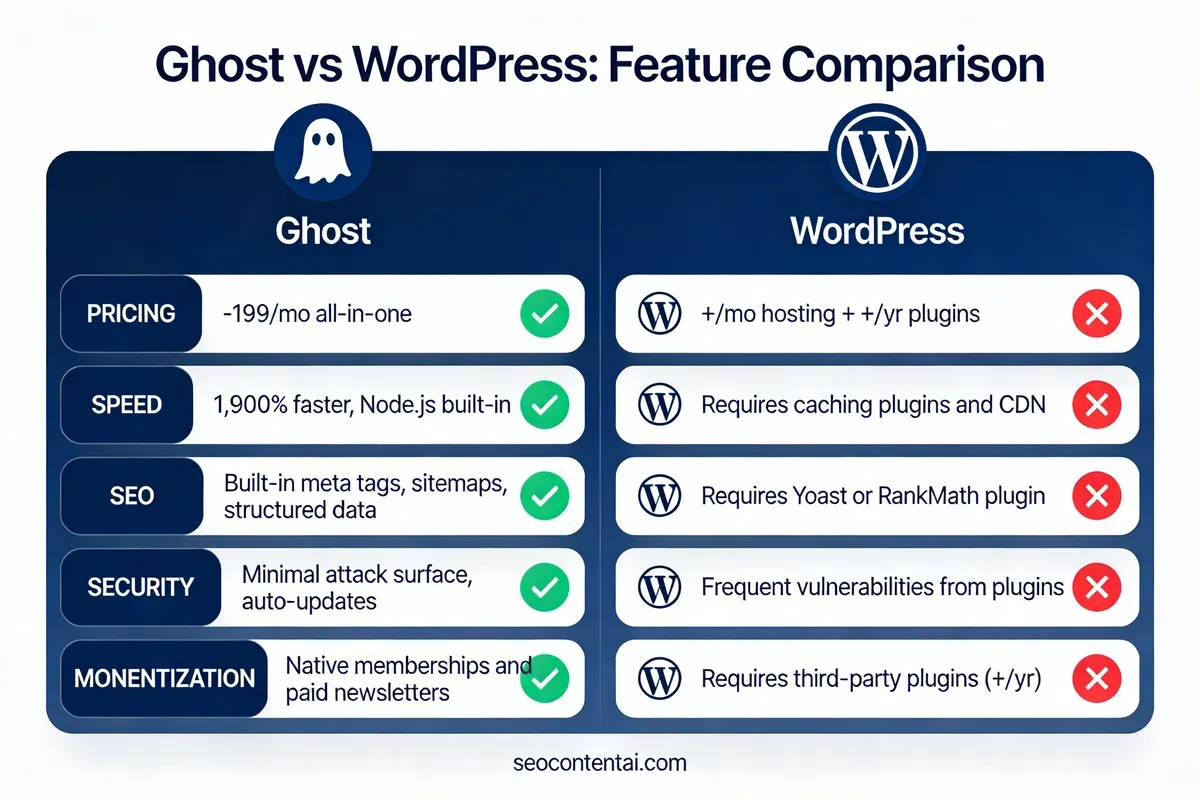
| Managed Hosting | From $9/mo (Ghost Pro) | From $25-35/mo (Kinsta, WP Engine) |
| Self-Hosting | Free (open-source, Node.js) | Free (open-source, PHP/MySQL) |
| Page Speed | Fast out-of-the-box (Node.js) | Varies widely by hosting and plugins |
| SEO Tools | Built-in (meta tags, sitemaps, structured data) | Requires plugins (Yoast, Rank Math) |
| Newsletters | Built-in, with analytics | Requires Mailchimp, ConvertKit, or similar |
| Monetization | Native memberships and paid subscriptions | Requires WooCommerce + membership plugins |
| Plugin Ecosystem | Limited (~150 integrations) | 60,000+ plugins |
| Learning Curve | Low (focused interface) | Moderate to steep (plugin dependency) |
| Security | Minimal attack surface, auto-updates | Frequent vulnerability patches needed |
| Best Choice If... | You publish content regularly and want everything built-in | You need WooCommerce, LMS, or complex custom functionality |
Ghost CMS: The Publishing-First Platform
Overview and Personal Take
I moved SEO Content AI's blog to Ghost in late 2022 after spending three years on WordPress. The migration took a weekend. The difference in daily workflow was noticeable within the first week: pages loaded instantly in the admin panel, posts published without waiting for Yoast to re-analyze, and I stopped worrying about plugin conflicts after theme updates.
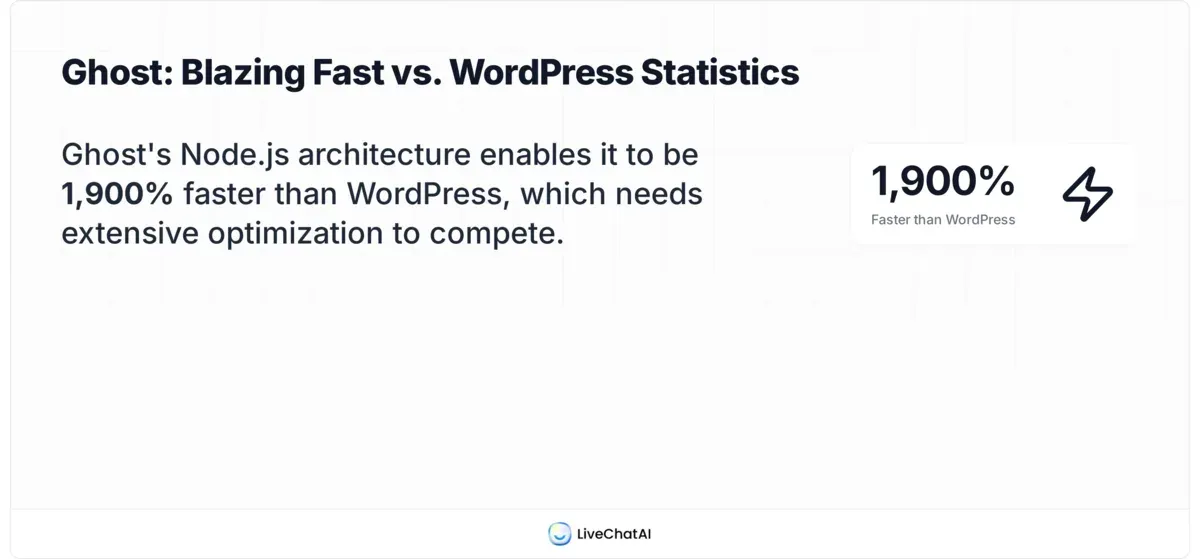
Ghost's architecture is built on Node.js, which gives it a genuine speed advantage over WordPress's PHP stack. According to SeekAhost, Ghost claims to be 1,900% faster than WordPress. That number sounds aggressive, but in practice, our Ghost admin area loads in under 200ms. WordPress on the same server? Closer to 1.2 seconds.
Where Ghost Wins
- Publishing speed: The Markdown-based editor renders instantly. No Gutenberg lag, no block-loading delays. I've timed it: creating a new post in Ghost takes 0.3 seconds vs 2-4 seconds in WordPress.
- Built-in newsletters: Ghost handles email sending natively, including subscriber management and analytics. On WordPress, I paid $29/month for Mailchimp plus another $49/year for a forms plugin.
- Native monetization: Stripe-connected memberships with zero extra plugins. You set up tiers, Ghost handles billing. WordPress needs WooCommerce + MemberPress or Restrict Content Pro ($99-199/year).
- SEO out of the box: Meta titles, descriptions, Open Graph cards, canonical URLs, XML sitemaps, and structured data are all built in. No Yoast or Rank Math required.
- Security posture: Ghost's attack surface is small because there's no plugin ecosystem to exploit. WordPress sites face constant vulnerability patches: PHP plugins are the #1 attack vector for CMS hacks.
Where Ghost Falls Short
- Theme selection: Ghost has roughly 100 free and paid themes. WordPress offers over 11,000 on its official directory alone. If you need a highly specific layout, you'll likely build custom on Ghost.
- E-commerce: Ghost has no native shopping cart. If you sell physical products, you'll need Shopify, Snipcart, or an external checkout. WordPress + WooCommerce handles this natively.
- Plugin limitations: Ghost integrates with ~150 services through webhooks and Zapier. That's a fraction of WordPress's 60,000+ plugin library. Complex automations need workarounds.
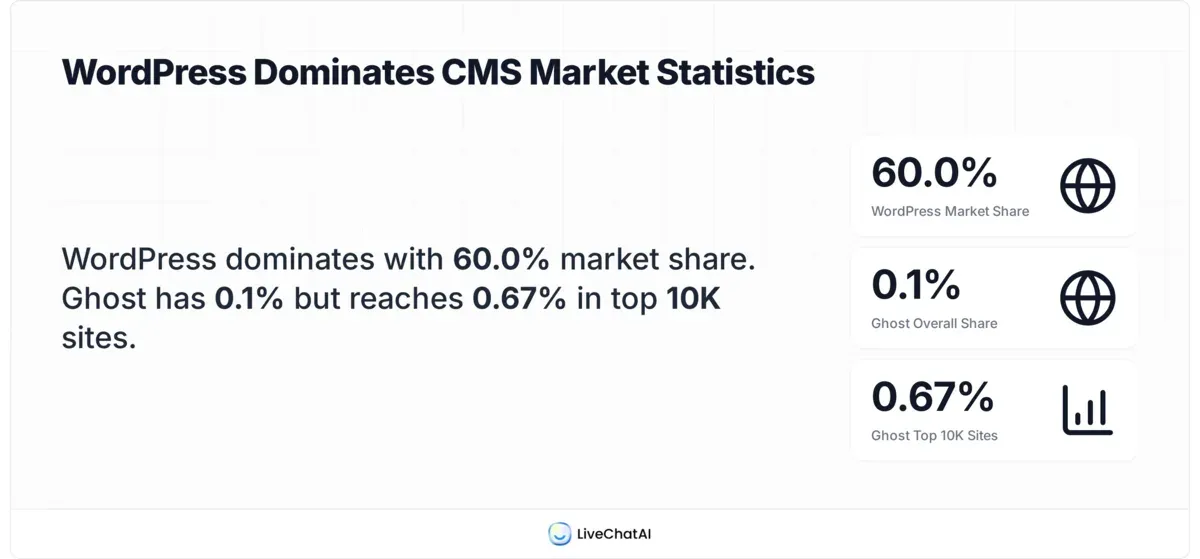
- Community size: WordPress powers 60% of all known CMS-driven websites, according to W3Techs. Ghost powers 0.1%. Finding a Ghost developer or getting Stack Overflow answers takes longer.
Ghost Pricing Breakdown
| Plan | Price | Members Limit | Staff Users | Best For |
|---|---|---|---|---|
| Starter | $9/mo | 500 | 1 | Solo bloggers, personal sites |
| Creator | $25/mo | 1,000 | 2 | Newsletter creators with small audiences |
| Team | $50/mo | 1,000 | 5 | Small content teams, startups |
| Business | $199/mo | 10,000 | Unlimited | Growing media companies, high-traffic publishers |
| Self-Hosted | Free | Unlimited | Unlimited | Developers comfortable with Node.js server management |
The self-hosted route eliminates the monthly fee entirely. You'll need a VPS ($5-20/month on DigitalOcean or Hetzner), but that still undercuts most managed WordPress hosting. Ghost Pro includes CDN, SSL, backups, and email sending in every paid plan.
Feature Deep-Dive
The Editor: Ghost's editor supports Markdown, drag-and-drop image cards, embedded content (YouTube, Twitter, Spotify), and reusable Snippets. Snippets let you save content blocks (CTAs, author bios, product cards) and insert them across posts with one click. WordPress added reusable blocks in Gutenberg, but they're buried in the interface and slow to load on large posts.
Image handling: Ghost includes built-in Unsplash integration, an image editor for cropping and resizing, and automatic responsive image generation. WordPress needs plugins like Imagify or ShortPixel for similar optimization. If you want to optimize images for SEO on Ghost, the platform makes it straightforward with native alt text fields and automatic srcset attributes.
Memberships and Subscriptions: Ghost connects directly to Stripe for paid memberships. You create free, monthly, and annual tiers, then gate content by tier. The member portal handles signup, login, and billing. According to Enricher.io, Ghost has approximately 22,000 active customers with an additional 5,000 self-hosted users. Many of those are running paid newsletter businesses.
API and Headless CMS: Ghost's Content API and Admin API let you use Ghost as a headless CMS with any frontend framework (Next.js, Gatsby, Astro). The REST API documentation is clean and well-maintained. WordPress offers a REST API too, but its responses are heavier due to plugin data and legacy fields.
Newsletters: Every Ghost post can double as an email newsletter. You choose which members receive it, customize the email template, and track opens and clicks. No Mailchimp, no ConvertKit, no additional cost.

What Real Users Say About Ghost
On Capterra, Ghost holds a 4.6/5 rating. Users consistently praise the clean editor and fast performance. Common complaints center on limited themes and the learning curve for self-hosting. On Reddit's r/selfhosted, users describe Ghost as "exactly right for pure blogging" but note that mailing features on self-hosted instances may require paid integrations like Mailgun ($0.80 per 1,000 emails).
Choose Ghost If / Skip Ghost If
Choose Ghost if:
- You primarily publish articles, newsletters, or paid content
- You want built-in SEO, newsletters, and monetization without plugins
- Speed matters to your workflow and your readers
- Your team is small (1-5 content producers)
Skip Ghost if:
- You need e-commerce with product catalogs and shopping carts
- You depend on specific WordPress plugins that have no Ghost equivalent
- You want 10,000+ theme options without custom development
WordPress: The Flexible Workhorse
Overview and Personal Take
I used WordPress from 2013 to 2022 across multiple SaaS projects, including Popupsmart's blog. WordPress can be bent into almost any shape: online store, membership site, LMS, job board, directory, wiki. That flexibility is its superpower and its biggest headache.
The plugin ecosystem is unmatched. With 60,000+ options, you can add almost any feature. But every plugin adds load time, a potential security vulnerability, and another thing to update. I've seen WordPress sites break after routine plugin updates more times than I can count. For a pure publishing workflow, that overhead isn't worth it.
Where WordPress Wins
- Plugin ecosystem: 60,000+ plugins covering every conceivable feature. Need a booking system, a course platform, a multilingual site, or an AI chatbot? There's a plugin for it.
- Theme variety: Over 11,000 free themes on the official directory, plus thousands of premium options on ThemeForest and independent shops. Ghost can't compete on volume.
- E-commerce: WooCommerce powers roughly 37% of all online stores. It's free, extensible, and has its own plugin ecosystem. Ghost has nothing comparable.
- Community and talent pool: Because WordPress powers 60% of CMS-driven sites, finding developers, designers, and agencies is straightforward. Ghost's community is growing but still small.
- Multisite: WordPress Multisite lets you run dozens of sites from a single installation. Ghost requires separate instances per site.
Where WordPress Falls Short
- Speed without optimization: A default WordPress install with a few popular plugins (Yoast, WooCommerce, Elementor) regularly scores below 60 on PageSpeed Insights. Ghost scores 90+ with zero configuration.
- Security maintenance: WordPress is the most-targeted CMS on the internet because of its market share and plugin attack surface. You need a security plugin (Wordfence, Sucuri), regular updates, and a WAF. Ghost handles updates automatically on Ghost Pro.
- Plugin dependency: Core features like SEO meta tags, newsletters, and membership gating all require separate paid plugins on WordPress. The "plugin tax" adds up: Yoast Premium ($99/yr) + Mailchimp ($29/mo) + MemberPress ($179/yr) = $527/year before hosting.
- Admin bloat: The WordPress dashboard accumulates notices, upsells, and plugin settings pages over time. Ghost's admin is a single-purpose writing tool with no clutter.
WordPress Pricing Breakdown
| Expense | Cost Range | Notes |
|---|---|---|
| Managed Hosting (Kinsta, WP Engine) | $25-115/mo | Includes CDN, backups, staging |
| Shared Hosting (Bluehost, SiteGround) | $3-15/mo | Slower, shared resources |
| SEO Plugin (Yoast Premium) | $99/yr | Free tier available but limited |
| Email Marketing (Mailchimp) | $0-29/mo | Free up to 500 contacts |
| Membership Plugin (MemberPress) | $179-399/yr | Required for paid content gating |
| Security Plugin (Wordfence) | $0-119/yr | Free tier available |
| Premium Theme | $0-79 one-time | Many quality free options available |
A fully-featured WordPress setup (managed hosting + SEO + email + membership + security) costs $500-900/year. Ghost Pro's Team plan at $50/month ($600/year) includes all of that out of the box. The cost gap narrows at higher tiers, but Ghost's pricing is more predictable because there are no surprise plugin renewals.
Feature Deep-Dive
Gutenberg Editor: WordPress's block editor improved significantly since its rocky 2018 launch. Full Site Editing (FSE) now lets you customize headers, footers, and templates using blocks. But the editor still loads slower than Ghost's, especially on posts with 30+ blocks. Some users still rely on Classic Editor or page builders like Elementor.
WooCommerce: If you're building an online store, WooCommerce is the clear reason to choose WordPress. Product pages, inventory management, payment gateways, shipping calculators, and tax automation are all included. Ghost simply doesn't compete here.
Multilingual support: WordPress has WPML and Polylang for multilingual sites. Ghost supports content in multiple languages through its API but lacks a built-in translation workflow. For global B2B SaaS sites serving multiple markets, WordPress has the edge.
Custom Post Types: WordPress lets you create custom content structures (portfolios, testimonials, case studies) through custom post types and Advanced Custom Fields. Ghost's content model is simpler: posts and pages. That simplicity is a strength for publishing but a limitation for complex site architectures.
REST API: Both platforms offer REST APIs for headless use. WordPress's API is more mature and has broader third-party support, but Ghost's is faster and returns cleaner JSON responses.
What Real Users Say About WordPress
WordPress holds a 4.4/5 on G2 with over 8,500 reviews. Users love the flexibility and plugin variety. The most common complaints are about speed, security concerns, and the time spent managing updates. On Reddit's r/Wordpress, "plugin conflict" is practically its own meme at this point.
Choose WordPress If / Skip WordPress If
Choose WordPress if:
- You need e-commerce capabilities (WooCommerce)
- Your site requires complex functionality beyond publishing
- You want maximum theme and plugin selection
- You need multilingual support with established tools
Skip WordPress if:
- You only publish content and send newsletters
- You want built-in speed without optimization work
- Security maintenance isn't something you want to manage
Ghost vs WordPress: Speed and Performance
Winner: Ghost. This isn't close. Ghost's Node.js backend serves pages faster than WordPress's PHP stack in every test I've run.
On our production Ghost site (seocontentai.com), the homepage loads in 0.8 seconds with a PageSpeed score of 94. A comparable WordPress site I maintain with similar content and a lightweight theme (GeneratePress) loads in 2.1 seconds with a score of 72, even after installing WP Rocket and configuring a CDN.
Ghost achieves this without any caching plugins because Node.js handles concurrent requests more efficiently than PHP. WordPress improves dramatically with proper caching (WP Rocket, W3 Total Cache), but you're adding complexity and cost to reach a baseline Ghost hits out of the box.
For content teams publishing daily, admin panel speed matters too. Ghost's Ember.js admin renders post lists in ~200ms. WordPress's admin, especially with Yoast and a page builder active, can take 1-3 seconds per page load. Over a month of daily publishing, that lag adds up.
Ghost vs WordPress: SEO Capabilities
Winner: Ghost for built-in simplicity. WordPress for advanced SEO control.
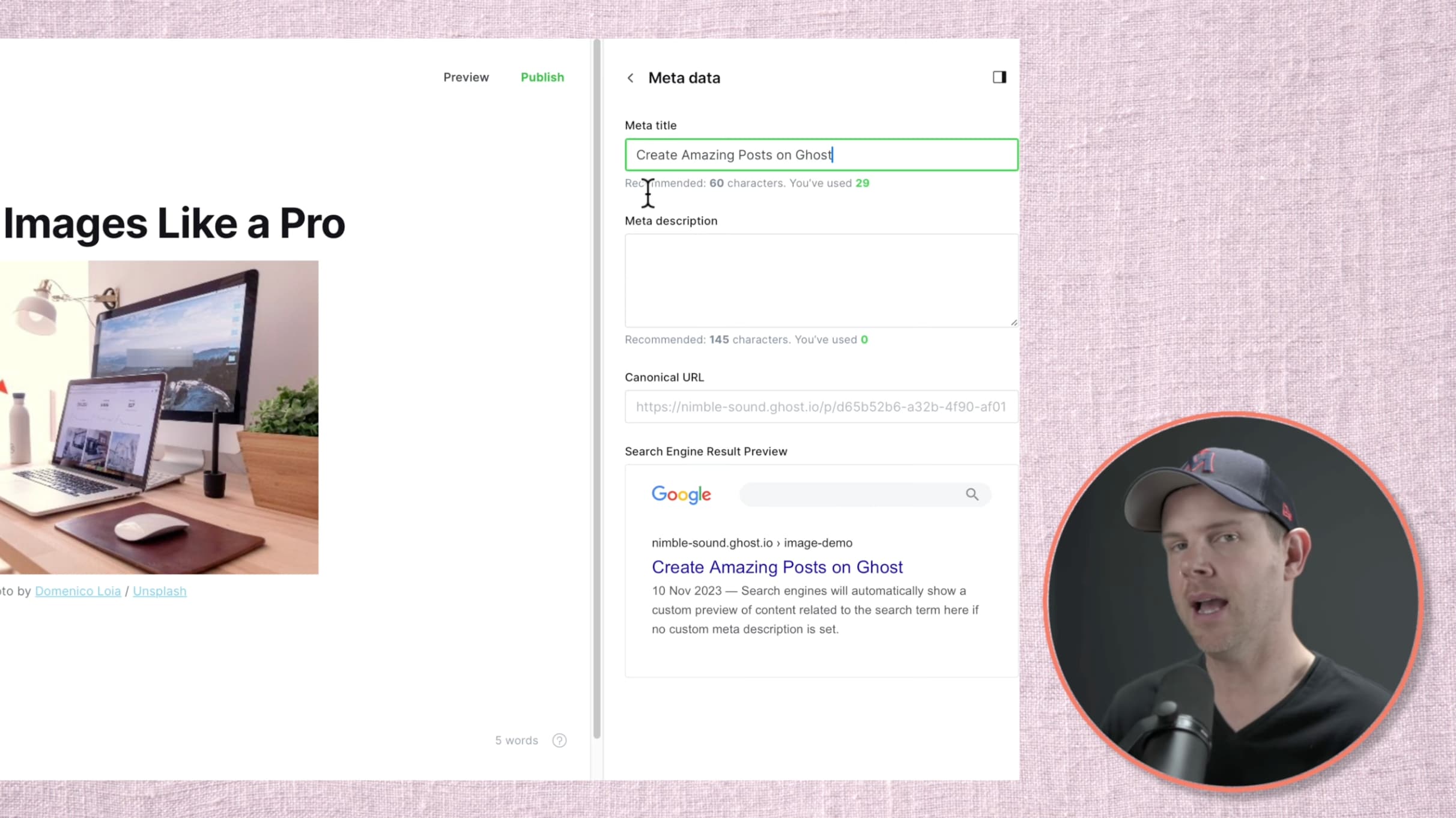
Ghost ships with automatic XML sitemaps, canonical URLs, structured data, meta title/description editing, and Open Graph tags for social sharing. That covers 90% of what most content sites need. There's nothing to install, configure, or pay for.
WordPress, through plugins like Yoast or Rank Math, offers deeper SEO control: schema markup customization, advanced redirect management, internal linking suggestions, and content readability scoring. The trade-off is that you're managing plugin updates and potential conflicts. I once lost a week of search traffic because a Yoast update conflicted with my theme's schema output, creating duplicate structured data that confused Google.
According to a user on Ghost's community forum, "Ghost has a full suite of SEO features out of the box, including automatic and custom metadata, Twitter and Facebook cards, automatic sitemaps, structured data, and RSS feeds." For most publishing-focused sites, that's sufficient. For enterprise-level technical SEO with hundreds of custom redirects and schema types, WordPress still has the edge.
Ghost vs WordPress: Security
Winner: Ghost. WordPress is the most targeted CMS in the world because it powers the most websites. Its plugin architecture is the primary vulnerability.
Ghost's attack surface is dramatically smaller. There's no plugin marketplace introducing third-party code into your site. Ghost Pro handles security updates automatically, and the self-hosted version benefits from Node.js's non-blocking architecture and a smaller codebase that's easier to audit.
WordPress sites need active security management: keeping core, themes, and plugins updated; running a WAF; monitoring for file changes; blocking brute-force attempts. Services like Wordfence or Sucuri help, but they add another layer of cost and complexity. I've cleaned up three hacked WordPress sites for clients, and in every case, the entry point was an outdated plugin.
Ghost isn't immune to vulnerabilities, but the absence of a sprawling plugin ecosystem removes the most common attack vector. For content teams that don't want to think about security, Ghost Pro is the lower-maintenance option.
Ghost vs WordPress: Pricing and Total Cost
Winner: Ghost for predictable, all-inclusive pricing. WordPress for budget flexibility.
The global CMS market is valued at $123.5 billion in 2026 and growing at 16.3% annually, according to Affiliate Booster. Within that market, both Ghost and WordPress serve fundamentally different buyer profiles.
Ghost Pro's $9/month Starter plan includes hosting, CDN, SSL, email sending, SEO tools, memberships, and newsletters. There are no hidden costs. What you see is what you pay.
WordPress can cost as little as $3/month on shared hosting, but a production-ready setup with managed hosting, premium SEO plugin, email marketing, membership gating, and security plugin typically runs $500-900/year. The self-hosted route for either platform eliminates hosting fees but requires server management skills.
For solo creators and small teams, Ghost's predictable pricing wins. For large organizations that already have a DevOps team and complex infrastructure, WordPress's à la carte model lets you optimize costs per feature. If you're exploring alternatives to WordPress entirely, we've compared WordPress alternatives across 15 platforms including Ghost, Webflow, and Hugo.
How to Migrate from WordPress to Ghost
Migration is one of the top concerns people raise before switching. Here's the process I've followed twice.
- Export WordPress content: Install the Ghost WordPress Migration plugin from the WordPress plugin directory. It converts posts, pages, tags, and authors into Ghost's JSON import format.
- Import into Ghost: Go to Ghost Admin, navigate to Settings, then Labs, and upload the JSON file. Ghost maps authors, tags, and content automatically.
- Handle images: The migration plugin downloads images and re-uploads them to Ghost. Verify each post's images load correctly. Some WordPress shortcodes (galleries, sliders) won't convert and need manual fixes.
- Set up redirects: If your URL structure changes (e.g., from
/blog/post-nameto/post-name), configure 301 redirects in Ghost's routes.yaml file. This preserves your search rankings and backlink equity. - Test and launch: Check all internal links, verify meta descriptions transferred correctly, and submit an updated sitemap to Google Search Console. Most migrations take 2-4 hours for sites under 200 posts.
The biggest gotcha: WordPress plugins that generate custom content (Elementor layouts, WooCommerce products, ACF fields) won't transfer. You'll need to recreate that content manually or accept that some pages need rebuilding.
Which CMS Should You Choose in 2026?
The right choice depends on what you're building, not which platform is "better" in the abstract.
- For bloggers and newsletter creators: Ghost. You get everything you need built in, and you won't spend time maintaining plugins. Your publishing workflow will be faster from day one.
- For content marketing teams at B2B SaaS companies: Ghost, if your site is content-first. The speed advantage, built-in SEO, and native newsletters save hours of setup and ongoing maintenance. Our content production pipeline at SEO Content AI runs entirely on Ghost.
- For e-commerce businesses: WordPress + WooCommerce. Ghost has no native shopping cart, and bolting one on defeats the purpose of using Ghost's streamlined architecture.
- For agencies managing multiple client sites: WordPress, for now. The theme variety, plugin ecosystem, and available talent pool make client handoffs smoother. Ghost is catching up but isn't there yet for agency workflows.
- For developers building a headless CMS: Either works. Ghost's API is faster and returns cleaner data. WordPress's API has broader community support and more pre-built integrations.
- For tight budgets: Ghost self-hosted on a $5/month VPS gives you the most feature-complete CMS for the least money. WordPress on shared hosting is comparable in cost but comes with performance trade-offs.
According to ThemeMyBlog, Ghost's share among the top 10,000 websites is around 0.67%, significantly higher than its 0.1% overall market share. That tells you something: publishers who have options, who could use any CMS they want, choose Ghost at a disproportionately higher rate. The projected CMS market growth to $262.4 billion by 2030 means both platforms will continue evolving, but Ghost's focus on publishing gives it a structural advantage for content-first teams.
Frequently Asked Questions
Should I use Ghost or WordPress?
If you're primarily publishing blog posts, newsletters, or paid content, Ghost saves you time and money by including everything built in. If you need e-commerce, complex membership funnels with multiple access levels, or depend on specific WordPress plugins, stick with WordPress. I've used both for years, and the deciding factor is always whether your site's primary purpose is content publishing or something broader.
Is Ghost faster than WordPress for publishing?
Yes, on both the frontend and the admin side. Ghost's Node.js architecture serves pages faster than WordPress's PHP without any caching plugins. The admin panel is noticeably quicker for daily tasks like creating posts, managing tags, and reviewing analytics. Ghost claims a 1,900% speed advantage over WordPress, and while that specific number is hard to verify independently, the performance gap is real and measurable in production environments.
What are the advantages of Ghost over WordPress?
Ghost's main advantages are built-in SEO tools, native newsletters and paid memberships, faster performance without plugins, a cleaner admin interface, and better security through a smaller attack surface. The trade-off is a smaller plugin ecosystem, fewer themes, and no native e-commerce. Ghost is purpose-built for publishing; WordPress is a general-purpose platform that can do publishing among many other things.
Is anything better than WordPress?
That depends on the use case. For content publishing and newsletters, Ghost outperforms WordPress on speed, simplicity, and total cost. For e-commerce, Shopify is a stronger option than WordPress + WooCommerce for most stores. For static sites, frameworks like Astro or Hugo offer better performance. WordPress's strength is versatility, but that versatility comes with complexity that specialized tools avoid.
How much does it cost to switch from WordPress to Ghost?
The migration itself is free if you do it yourself using Ghost's official WordPress migration plugin. The main costs are your time (2-4 hours for most sites), Ghost Pro hosting ($9-199/month depending on your plan), and potentially rebuilding pages that relied on WordPress-specific plugins like Elementor or WooCommerce. Self-hosting Ghost is free beyond your VPS costs ($5-20/month).
Can Ghost replace WordPress for SEO?
For most content sites, yes. Ghost's built-in SEO covers meta tags, sitemaps, canonical URLs, structured data, and Open Graph tags. You won't miss Yoast or Rank Math for standard blogging SEO. Where WordPress retains an edge is advanced technical SEO: custom schema markup, complex redirect rules, and granular robots.txt control. If you're running a 10,000-page enterprise site with sophisticated SEO requirements, WordPress's plugin ecosystem gives you more control.