
How to Measure SEO Results: The Metrics That Actually Matter in 2026
Last Updated: February 2026
Measuring SEO results requires tracking four categories of data: organic traffic and engagement in Google Analytics 4 (GA4), search performance in Google Search Console (GSC), keyword rankings in a tool like Ahrefs or Semrush, and conversion metrics tied to business outcomes. The most important single metric is organic traffic trend compared to the same period last year, which eliminates seasonal noise and reveals whether your SEO strategy is working.
What Are the Most Important SEO Metrics to Track?
Not all SEO metrics matter equally. After 12 years of running digital marketing campaigns — first at Flatart Agency and now across Popupsmart, LiveChatAI, and this Ghost blog — I've narrowed down what actually moves the needle versus what creates noise.
| Metric | Where to Find It | Why It Matters | Check Frequency |
|---|---|---|---|
| Organic sessions | GA4 > Traffic acquisition | Total volume of search-driven visits | Weekly |
| Impressions & clicks | Google Search Console > Performance | Shows visibility before traffic arrives | Weekly |
| Average position | Google Search Console > Performance | Tracks ranking movement for target keywords | Bi-weekly |
| Click-through rate (CTR) | Google Search Console > Performance | Measures how compelling your SERP listing is | Monthly |
| Engagement rate | GA4 > Engagement overview | Replaced bounce rate — measures meaningful interaction | Monthly |
| Conversions (key events) | GA4 > Key events | Ties SEO traffic to business outcomes | Weekly |
| Core Web Vitals | GSC > Core Web Vitals / PageSpeed Insights | Page experience directly affects rankings | Monthly |
| Indexed pages | GSC > Pages report | Ensures content is discoverable by Google | Monthly |
| Referring domains | Ahrefs / Semrush | Tracks backlink growth (authority signal) | Monthly |
How Do You Track Organic Traffic in Google Analytics 4?
Google Analytics 4 (GA4) replaced Universal Analytics in July 2023. If you're still referencing UA reports or metrics like "bounce rate" in the old sense, those no longer apply. GA4 uses an event-based model that tracks user engagement differently.
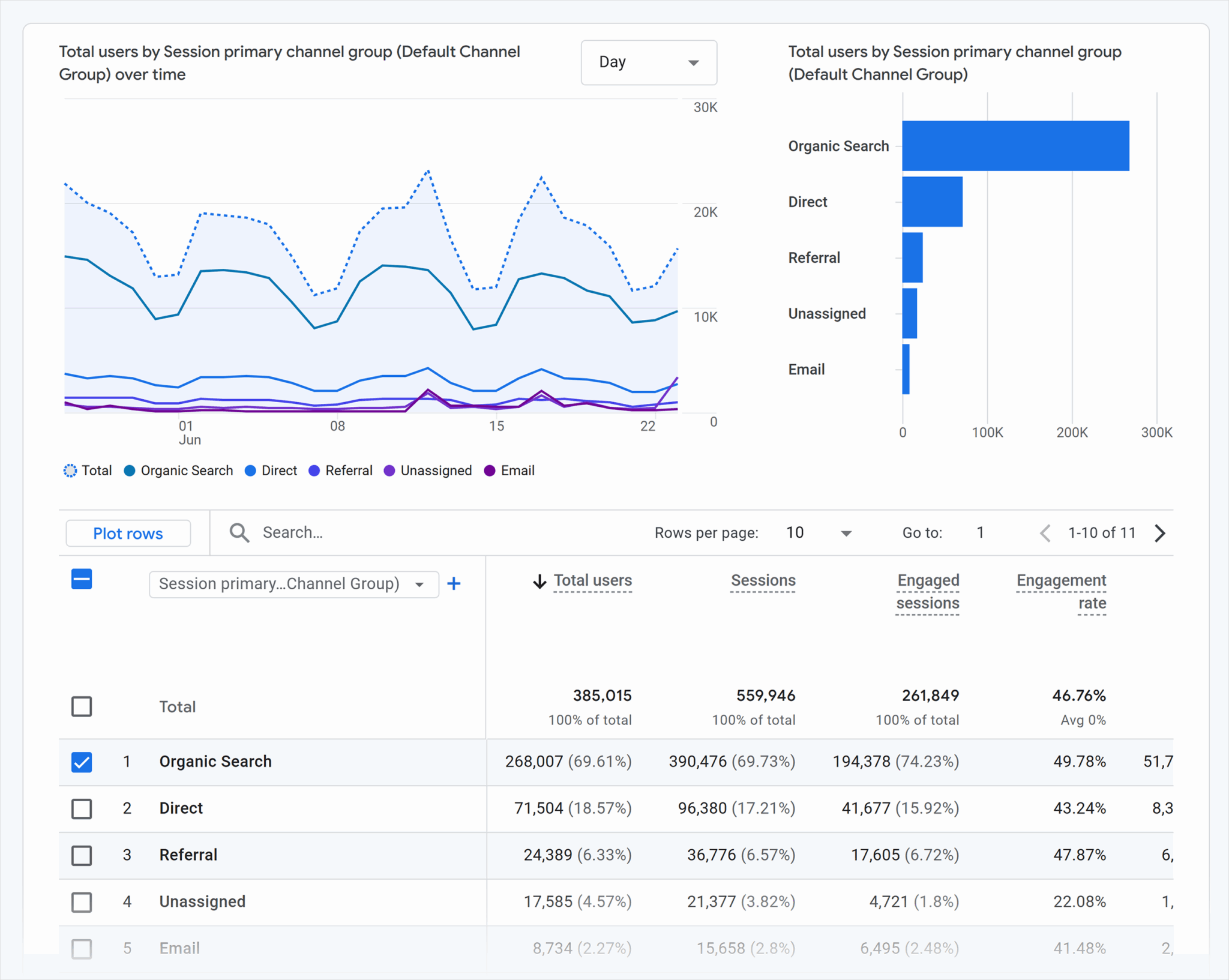
To view organic search traffic in GA4:
- Navigate to Reports > Acquisition > Traffic acquisition
- Look for the "Organic Search" row in the default channel grouping
- Compare to previous period — click the date range and toggle "Compare" to the same period last year
- Check engaged sessions (sessions lasting 10+ seconds, with a key event, or with 2+ page views) alongside total sessions
The year-over-year comparison is critical. Weekly organic traffic fluctuates due to holidays, algorithm updates, and seasonal demand. Comparing January 2026 to January 2025 eliminates these variables and shows the real trend. According to Google's GA4 documentation, the traffic acquisition report provides the most accurate view of how users arrive at your site by channel.
Key GA4 Metrics for SEO
| GA4 Metric | What It Measures | Good Benchmark |
|---|---|---|
| Engagement rate | Percentage of sessions that were "engaged" (10s+, key event, or 2+ pages) | Above 60% |
| Average engagement time | Mean time users actively interact with your page | Above 1 minute for blog content |
| Sessions per user | How often visitors return | Above 1.3 (indicates returning traffic) |
| Key events (conversions) | Goal completions from organic traffic | Depends on business model |
One important shift: GA4's "engagement rate" is effectively the inverse of the old bounce rate, but measured more accurately. A session is "engaged" if the user spent at least 10 seconds, triggered a key event, or viewed 2+ pages. This gives a much better picture of content quality than the old binary "bounced or didn't bounce" metric in Universal Analytics.
How Do You Use Google Search Console to Measure SEO Performance?
Google Search Console (GSC) is the only tool that shows you data directly from Google's search index. While GA4 tells you what happens after users arrive, GSC tells you what happens before they click — how often your pages appear in search results, for which queries, and at what position.
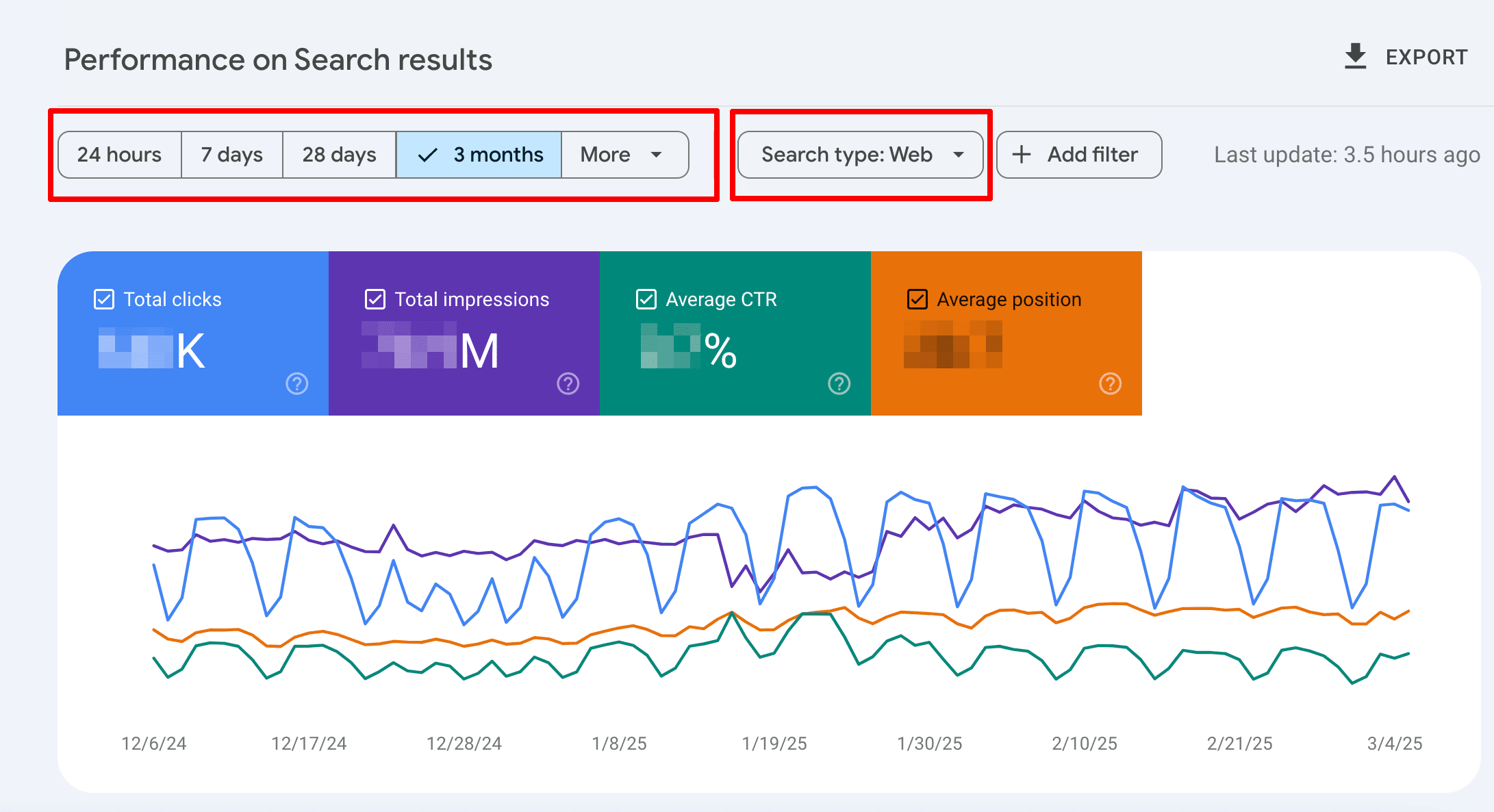
The four core GSC metrics:
- Impressions — how many times your pages appeared in Google search results
- Clicks — how many times users clicked through to your site
- Average CTR — clicks divided by impressions (indicates SERP listing quality)
- Average position — your average ranking across all queries
Navigate to Performance > Search results in GSC. I recommend these specific workflows:
Finding Quick-Win Keywords
Filter by average position between 5 and 15. These are keywords where you're on page 1 or the top of page 2 — close enough to drive significant traffic with minor improvements. Sort by impressions (highest first) to find the queries with the most search volume that you're almost ranking for. According to Sistrix's CTR study, the difference between position 5 and position 3 can double your click-through rate.
Diagnosing CTR Problems
Filter for high-impression, low-CTR queries. If a page gets 1,000+ impressions per month but has a CTR below 2%, your title tag or meta description isn't compelling enough. Review what competitors show for the same query and rewrite your SERP listing to be more specific and actionable. On Ghost, you can customize meta titles and descriptions independently from your post title (here's how to edit meta tags on Ghost).
Monitoring Indexing Health
Check Pages report (previously called "Coverage") monthly. This shows how many of your pages Google has indexed, and flags pages that couldn't be indexed with specific error reasons. Common issues include:
- Crawled - currently not indexed — Google found the page but deemed it not valuable enough to index (often a content quality signal)
- Discovered - currently not indexed — Google knows the URL exists but hasn't crawled it yet (may indicate crawl budget issues)
- Duplicate without user-selected canonical — multiple versions of the same content exist
How Do You Track Keyword Rankings Effectively?
Keyword ranking is no longer about checking if you're "#1 for your target keyword." Search results are personalized by location, device, search history, and even time of day. Position tracking tools provide an approximation, not an absolute truth.
That said, tracking keyword positions over time reveals trends that GSC alone can't show. GSC aggregates data and has a 2-3 day delay, while dedicated rank trackers show daily movement.
Recommended Rank Tracking Tools (2026)
| Tool | Starting Price | Keywords Tracked | Best For |
|---|---|---|---|
| Ahrefs | $129/month | 750 | All-in-one SEO: backlinks, content gaps, rank tracking |
| Semrush | $139.95/month | 500 | Competitive analysis, PPC + SEO combined |
| SE Ranking | $65/month | 500 | Budget-friendly with solid accuracy |
| Google Search Console | Free | Unlimited (aggregated) | Baseline data directly from Google |
When I track keyword rankings for seocontentai.com, I focus on three categories:
- Target keywords — the specific queries I'm intentionally optimizing for (e.g., "Ghost SEO," "Ghost vs Medium")
- Discovered keywords — queries GSC shows I'm ranking for that I didn't intentionally target (often long-tail variations that reveal content gaps)
- Competitor keywords — queries where competing Ghost/CMS blogs rank but I don't (identifies new content opportunities)
Don't obsess over daily ranking fluctuations. Google's index updates constantly, and positions can shift by 2-3 spots within a single day. Look at the 30-day and 90-day trend instead. A keyword that moved from position 15 to position 8 over 3 months is a clear win, even if it bounced between 7 and 12 on individual days.
How Do You Measure Core Web Vitals and Page Experience?
Core Web Vitals are Google's standardized metrics for page experience, and they directly influence search rankings. According to Google's documentation, pages that pass all three CWV thresholds receive a ranking boost in mobile search results.
| Metric | What It Measures | Good | Needs Improvement | Poor |
|---|---|---|---|---|
| Largest Contentful Paint (LCP) | Loading speed of main content | Under 2.5s | 2.5s - 4.0s | Over 4.0s |
| Interaction to Next Paint (INP) | Responsiveness to user input | Under 200ms | 200ms - 500ms | Over 500ms |
| Cumulative Layout Shift (CLS) | Visual stability (unexpected layout shifts) | Under 0.1 | 0.1 - 0.25 | Over 0.25 |
Note: INP replaced First Input Delay (FID) as a Core Web Vital in March 2024. If you're still tracking FID, update your monitoring.
Check Core Web Vitals in two places:
- Google Search Console > Core Web Vitals — shows field data (real user measurements) for your entire site, grouped by "Good," "Needs improvement," and "Poor" URLs
- PageSpeed Insights — tests individual URLs with both lab data (simulated) and field data (real Chrome users via CrUX)
For Ghost blogs specifically, image optimization is usually the biggest lever for improving LCP. Uncompressed feature images are the #1 cause of slow LCP on content-heavy sites (see our Ghost image optimization guide). Pairing image optimization with Cloudflare caching handles most performance issues on Ghost.
How Do You Connect SEO Traffic to Business Conversions?
Traffic without conversions is vanity. The ultimate measure of SEO success is whether organic visitors take actions that matter to your business — subscribing, purchasing, signing up, or contacting you.
In GA4, conversions are called "key events." To set one up:
- Go to Admin > Events in GA4
- Find the event you want to track (e.g.,
form_submit,purchase,sign_up) - Toggle "Mark as key event"
- View results in Reports > Engagement > Key events, filtered by "Organic Search" traffic source
For Ghost blogs with paid memberships, the most relevant key events are:
- Newsletter signup — free member registration (track the Ghost Portal signup confirmation page)
- Paid subscription — conversion from free to paid member
- Content engagement — reading multiple articles in a session (indicates high-value visitor)
Calculate your organic conversion rate: (organic key events / total organic sessions) x 100. A healthy blog conversion rate (email signup) is 2-5% of organic traffic. If you're below 1%, the traffic might be coming from keywords that don't match your offering, or your calls-to-action need improvement.
How Often Should You Check SEO Metrics?
Over-monitoring creates anxiety without actionable insights. SEO moves slowly — most changes take 2-8 weeks to show measurable impact in search results. Here's the reporting cadence I use:
| Frequency | What to Check | Why |
|---|---|---|
| Weekly | Organic sessions trend (GA4), GSC clicks/impressions | Catch sudden drops early (algorithm updates, indexing issues) |
| Bi-weekly | Keyword position changes for target terms | Track content optimization impact |
| Monthly | Full performance review: CTR, engagement, CWV, backlinks, conversions | Strategic adjustments to content plan |
| Quarterly | Year-over-year traffic comparison, content audit, competitor gap analysis | Big-picture strategy evaluation |
The weekly check should take under 10 minutes. Open GA4 and GSC, compare organic traffic to the previous week and the same week last year, and look for anomalies. If traffic dropped 20%+ unexpectedly, investigate immediately — it could be an indexing issue, algorithm update, or technical problem. Otherwise, save deeper analysis for the monthly review.
What Tools Do You Need to Measure SEO Results?
You don't need expensive tooling to measure SEO effectively. Two free tools cover 80% of what matters:
- Google Analytics 4 (free) — traffic, engagement, conversions
- Google Search Console (free) — search performance, indexing, technical health
For deeper analysis, add one paid tool:
- Ahrefs — best overall for backlink analysis, keyword research, content gap analysis, and rank tracking
- Semrush — best if you also run paid search campaigns alongside SEO
Avoid tool overload. Running three rank trackers and five analytics platforms creates confusion, not clarity. Pick one primary tool per metric category, learn it deeply, and build a consistent reporting workflow around it.
For a deeper dive into Ghost-specific SEO tooling, see our comprehensive guide to SEO tools for Ghost. And if you want to level up your overall Ghost SEO strategy, our Ghost SEO hacks guide covers the most impactful techniques I've used on this blog.