
How to Add Nofollow Links in Ghost: Complete Guide to rel="nofollow", "sponsored", and "ugc" (2026)
A nofollow link uses the rel="nofollow" HTML attribute to tell search engines not to pass link equity (PageRank) to the destination URL. In Ghost CMS, you add nofollow links by inserting an HTML card in the editor and manually adding the rel attribute to your <a> tag. This guide covers all four link attributes — nofollow, dofollow, sponsored, and ugc — with step-by-step Ghost editor instructions.
Last updated: February 2026
What Is a Nofollow Link and Why Does It Matter for SEO?
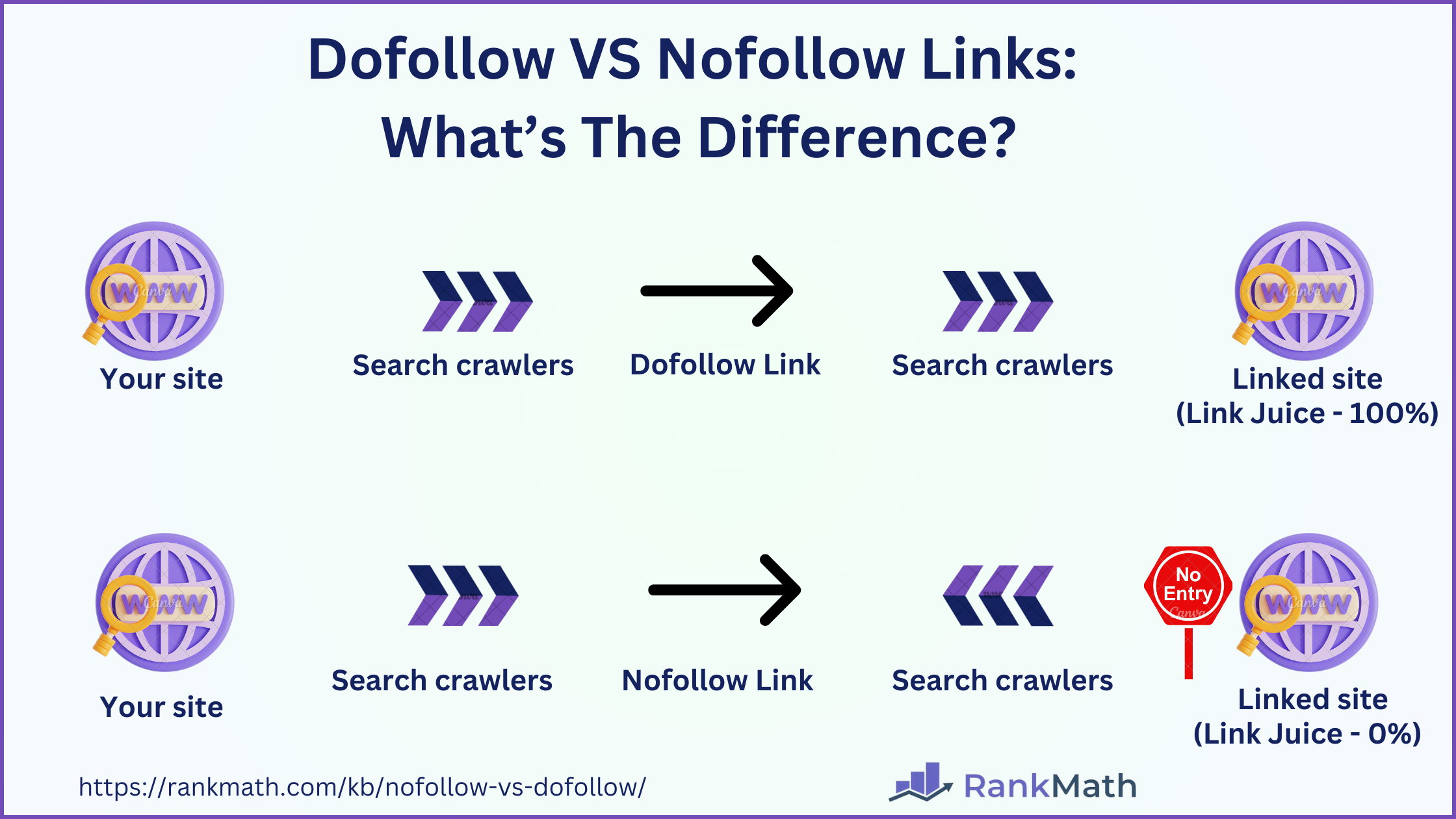
A nofollow link is a hyperlink with a rel="nofollow" attribute in the HTML. When a search engine crawler encounters this attribute, it treats the link as a signal not to transfer ranking authority (link juice) from your page to the linked page.
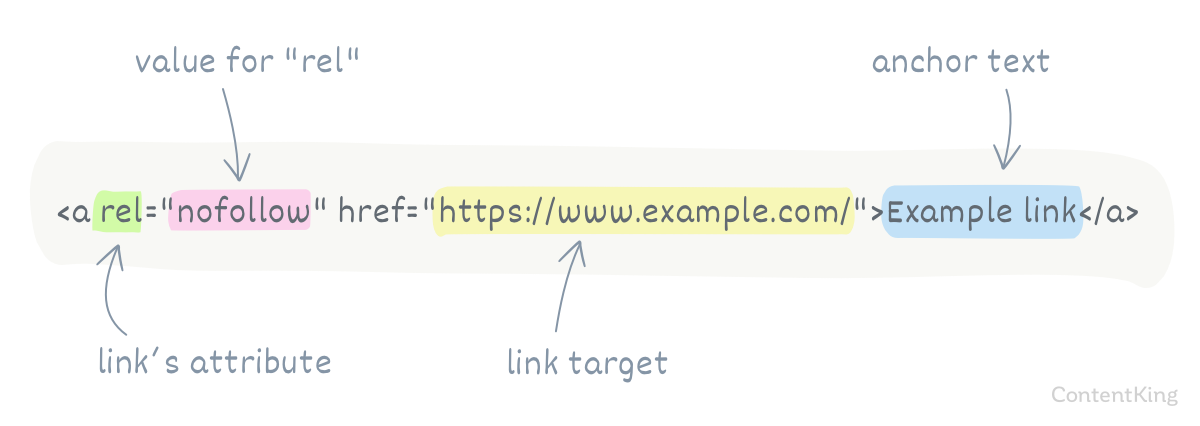
Here is what a standard dofollow link looks like in HTML:
<a href="https://example.com">Example</a>And here is the same link with the nofollow attribute:
<a href="https://example.com" rel="nofollow">Example</a>The only difference is rel="nofollow" — but the SEO impact is significant. Without it, every outbound link from your page passes a portion of your page's authority to the destination. With it, you keep that authority on your domain.
How Did Google's Nofollow Policy Change in 2019?
In September 2019, Google made a major change to how it handles nofollow links. Before 2019, rel="nofollow" was treated as a directive — Google strictly obeyed it and never followed or counted those links.
After the September 2019 update, Google changed nofollow to a hint rather than a directive. This means Google may choose to crawl, index, or consider nofollow links for ranking purposes when it believes the link provides valuable signal. At the same time, Google introduced two new link attributes:
rel="sponsored"— for paid links, advertisements, and sponsorshipsrel="ugc"— for user-generated content like comments and forum posts
These attributes give Google more granular information about why a link is marked, instead of the blanket "nofollow" signal.
What Are the Four Link Attribute Types? (Comparison Table)
Understanding the differences between all four link relationship types is essential for proper SEO. Here is a complete comparison:
| Attribute | HTML Code | Passes Link Equity? | When to Use | Google Treatment (2026) |
|---|---|---|---|---|
| dofollow (default) | <a href="..."> | Yes | Trusted, editorial links you endorse | Followed, indexed, passes PageRank |
| nofollow | <a href="..." rel="nofollow"> | No (hint) | General untrusted links, login pages, widgets | Treated as hint — may still follow |
| sponsored | <a href="..." rel="sponsored"> | No (hint) | Paid links, affiliate links, advertisements | Treated as hint — preferred over nofollow for paid links |
| ugc | <a href="..." rel="ugc"> | No (hint) | User-generated content: comments, forums, reviews | Treated as hint — helps Google filter UGC signals |
You can also combine attributes. For example, rel="nofollow sponsored" works if you want backward compatibility with older crawlers that only understand nofollow.
Which Attribute Should You Choose?
| Scenario | Recommended Attribute | Why |
|---|---|---|
| Linking to a competitor's product page | rel="nofollow" | You don't want to pass authority to competitors |
| Affiliate link to Amazon or a partner | rel="sponsored" | Google expects paid/affiliate links to be marked as sponsored |
| Embedding a reader's comment with a link | rel="ugc" | Protects you from spam links in user content |
| Linking to a trusted, authoritative source | No attribute (dofollow) | Passing link equity to quality sources is a positive SEO signal |
| Link in a sidebar widget or footer | rel="nofollow" | Sitewide links can look manipulative; nofollow mitigates that |
| Press release with backlinks | rel="nofollow" | Google explicitly warns against dofollow links in press releases |
How Do You Add a Nofollow Link in Ghost? (Step-by-Step)
Ghost CMS does not have a built-in nofollow toggle in the link editor. When you highlight text and add a link in the Ghost editor, the resulting link is always dofollow by default. To add a nofollow (or sponsored/ugc) attribute, you need to use Ghost's HTML card.
Having managed the content for seocontentai.com since 2023, I use HTML cards regularly to control exactly which outbound links pass link equity and which do not. Here is the exact process I follow:
Step 1: Open the Ghost Editor and Position Your Cursor
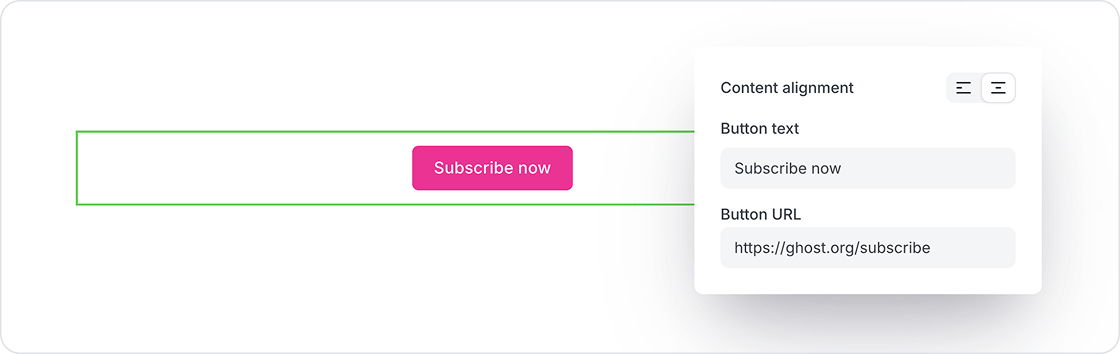
Open the post you want to edit in the Ghost editor. Place your cursor on a new blank line where you want the nofollow link to appear.
Step 2: Insert an HTML Card
Type / on the blank line to open the card menu. Scroll down and select HTML from the card options. Alternatively, you can type /html to filter directly to the HTML card.
A code editor block will appear where you can type raw HTML.
Step 3: Write Your Link with the rel Attribute
Type or paste the following HTML into the card:
<p>Check out <a href="https://example.com" rel="nofollow">this resource</a> for more details.</p>Key elements to customize:
- Replace
https://example.comwith your actual destination URL - Replace
this resourcewith your anchor text - Change
nofollowtosponsoredorugcdepending on the link type
Step 4: Wrap in a Paragraph Tag
If your nofollow link is part of a sentence or paragraph, always wrap the content in <p> tags. Without paragraph tags, the HTML card content may not render with proper spacing.
<p>I recommend using <a href="https://tool.com" rel="sponsored">this tool</a> for keyword research. It has saved me hours of manual work.</p>Step 5: Preview and Publish
Click outside the HTML card to see the rendered preview. The link will appear as normal clickable text — the rel attribute is invisible to readers but readable by search engine crawlers. Click Preview in the top-right corner to verify the link works correctly, then publish.
How to Combine Multiple Attributes
You can use multiple rel values separated by a space. This is useful when a link is both paid and you want the nofollow signal for backward compatibility:
<a href="https://partner.com" rel="nofollow sponsored">Partner Tool</a>Similarly, for a user-submitted link you don't trust:
<a href="https://userlink.com" rel="nofollow ugc">User's Website</a>When Should You Use Nofollow Links in Ghost Posts?
Not every outbound link needs a nofollow attribute. In fact, overusing nofollow can hurt your SEO by making your link profile look unnatural. Here are the specific situations where I use nofollow on seocontentai.com:
1. Untrusted or Unverified Websites
If you need to reference a website you cannot personally vouch for — such as a newly discovered tool, an anonymous source, or a site with questionable content — add rel="nofollow". This protects your domain's reputation. Google's outbound link documentation specifically recommends nofollow for links where you "don't want to imply any type of endorsement."
2. Affiliate and Paid Links (Use rel="sponsored")
Any link where money changes hands — affiliate programs, paid partnerships, sponsored content, advertisements — must use rel="sponsored" (or at minimum rel="nofollow"). The Google link spam policies are clear: buying or selling links that pass PageRank is a violation that can result in manual penalties.
From my experience running product review posts on this blog, I always mark affiliate links as rel="sponsored" rather than just nofollow. It gives Google more context and demonstrates transparency.
3. User-Generated Content (Use rel="ugc")
If your Ghost site has a comments section enabled (Ghost Members), or you feature reader submissions, links within that content should use rel="ugc". This tells Google the link was not editorially placed by you but was submitted by a user.
Ghost's built-in commenting system already handles this automatically for member comments. However, if you manually embed user testimonials or reader quotes that contain links, apply rel="ugc" in your HTML card.
4. Competitor Links You Must Reference
In comparison posts (like our Ghost vs Medium comparison), I sometimes need to link to competitor platforms. While I keep most authoritative reference links as dofollow, I use nofollow for links that go directly to competitor sign-up pages or pricing pages — there is no reason to pass ranking authority to a competitor's conversion page.
5. Press Releases and Syndicated Content
If you syndicate content or distribute press releases that link back to your site, those backlinks should be nofollow. Google has explicitly stated that links in press releases and advertorials should not pass PageRank.
When Should You Keep Links as Dofollow?
Equally important is knowing when not to add nofollow. These links should remain dofollow (the default):
- Internal links — Links between your own pages should always be dofollow. They help distribute link equity across your site and improve crawlability. Check our SEO tools for Ghost guide for more on internal linking strategy.
- Authoritative sources — Links to Google documentation, Wikipedia, academic papers, government sites (.gov), and major publications. Linking to authority signals quality and relevance.
- Citations and references — When you cite statistics, studies, or data from reputable sources, keeping those dofollow shows Google you have verified, trustworthy references.
- Partners you genuinely endorse — If you have an editorial, non-paid relationship and genuinely recommend a product, dofollow is appropriate.
What Happens If You Overuse Nofollow Links?
Making every outbound link nofollow is a common mistake. Here is why it can backfire:
| Problem | Why It Hurts SEO |
|---|---|
| Unnatural link profile | Google expects a healthy mix of dofollow and nofollow. An all-nofollow profile looks like you are hiding something or gaming the system. |
| Reduced crawl discovery | While Google now treats nofollow as a hint, excessive use may reduce how quickly Google discovers linked content relevant to your topic. |
| Loss of topical association | Dofollow links to authoritative sources help Google understand what topic your page is about. All-nofollow breaks that signal. |
| Trust signal weakening | Sites that generously link to high-quality sources (dofollow) tend to be seen as more trustworthy than sites that hoard link equity. |
A reasonable guideline is: keep 70-80% of your outbound links as dofollow (assuming they go to trusted, relevant sources) and reserve nofollow/sponsored/ugc for the specific cases listed above.
How Do You Check If a Link Is Nofollow?
After publishing your Ghost post, verify that your nofollow attributes are working correctly:
Method 1: Browser Inspect Tool
- Open your published post in Chrome or Firefox
- Right-click the link you want to check
- Select "Inspect" or "Inspect Element"
- In the Elements panel, find the
<a>tag and look for therelattribute
If you see rel="nofollow", rel="sponsored", or rel="ugc", the attribute is applied correctly.
Method 2: View Page Source
- On the published page, press
Ctrl+U(Windows) orCmd+Option+U(Mac) to view source - Press
Ctrl+F/Cmd+Fand search for the destination URL - Check the
relattribute on that link
Method 3: SEO Browser Extensions
Extensions like Ahrefs SEO Toolbar, SEOquake, or NoFollow Chrome extension can visually highlight nofollow links on any page, making it easy to audit your entire post at a glance.
Ghost-Specific Tips for Managing Link Attributes
After three years of managing link attributes on Ghost, here are patterns I have found useful:
Use a Consistent HTML Card Template
I keep a text snippet saved with my standard nofollow template so I don't have to type it from scratch each time:
<p>PARAGRAPH TEXT <a href="URL" rel="nofollow">ANCHOR TEXT</a> PARAGRAPH TEXT</p>Ghost Does Not Support Auto-Nofollow
Unlike WordPress (which has plugins like WP External Links that can auto-nofollow all outbound links), Ghost does not have an automatic nofollow setting or plugin. Every nofollow link must be added manually via HTML cards. This is actually a benefit — it forces you to be intentional about each link's attribute rather than applying a blanket rule.
Nofollow Does Not Work in Ghost's Standard Link Dialog
If you highlight text, click the link icon, and paste a URL — that link will always be dofollow. There is no way to add rel="nofollow" through the visual link editor. The only way is through the HTML card. This applies to all Ghost versions including Ghost 5.x.
Opening Links in New Tabs
If you also want your nofollow link to open in a new tab, add target="_blank" along with rel="nofollow noopener" for security:
<a href="https://example.com" rel="nofollow noopener" target="_blank">Example</a>The noopener attribute prevents the linked page from accessing your page's window.opener object, which is a security best practice for all external links that open in new tabs.
How Do Nofollow Links Affect Your Ghost Blog's SEO?
Let me be direct about the impact based on what I have observed across the posts on this site:
- Nofollow links do not directly boost your rankings. They are a defensive tool, not an offensive one.
- Proper use prevents penalties. Marking paid links as sponsored and untrusted links as nofollow keeps you compliant with Google's spam policies.
- Dofollow links to authority sources help your rankings. Google's algorithms factor in the quality of your outbound links as a relevance signal. Linking to strong sources (dofollow) in your niche strengthens your topical authority.
- Internal links should never be nofollow. Every internal nofollow is wasted crawl budget and lost link equity distribution. For measuring how your internal linking impacts rankings, see our guide to measuring SEO results.
Nofollow Links in Ghost: FAQs
Can I add nofollow links automatically in Ghost?
No. Ghost does not have an automatic nofollow feature or plugin system. You must manually add rel="nofollow" through the HTML card in the Ghost editor for each link you want to mark. This applies to all Ghost versions (4.x and 5.x).
What is the difference between nofollow and sponsored?
rel="nofollow" is a general-purpose attribute that tells Google not to follow a link. rel="sponsored" specifically indicates a paid or compensated link. Google recommends using sponsored for paid links because it provides more precise information than the generic nofollow. Both prevent link equity from passing.
Do nofollow links count as backlinks?
Yes, nofollow links are still counted as backlinks in tools like Ahrefs, Semrush, and Google Search Console. However, they pass little or no ranking authority. Since 2019, Google treats nofollow as a hint, meaning some nofollow links may be factored into rankings if Google determines they provide valuable signal.
Should I nofollow all external links on my Ghost blog?
No. Nofollow-ing every external link creates an unnatural link profile and can hurt your topical authority signals. Only use nofollow for untrusted sites, competitors, and links covered by the scenarios in this guide. Keep links to authoritative sources (Google documentation, academic research, government sites) as dofollow.
Can I add nofollow to an existing link without the HTML card?
No. Once a link is created through Ghost's standard link dialog (the visual editor), there is no way to edit its HTML attributes. You need to delete the original link, insert an HTML card in its place, and recreate the link with the rel attribute in raw HTML.
Does Ghost add nofollow to comments automatically?
Ghost's built-in Member commenting system does not allow commenters to add clickable links — comment text is plain text only. If you embed user-generated content manually (such as testimonials with links), use the HTML card with rel="ugc" to mark those links appropriately.
What about rel="noopener" and rel="noreferrer"?
noopener and noreferrer are security-related attributes, not SEO attributes. noopener prevents the linked page from accessing your page's window object (use it with target="_blank"). noreferrer hides the referrer URL from the destination site. Neither affects PageRank or link equity — they serve different purposes than nofollow.